Oct 18, 2026 · 25 min
How a salesperson can automate sales and cold outreach with AI, no programmer needed
A step-by-step system for people who sell and do not use AI yet. Claude Code in the terminal, a knowledge base and CRM in Obsidian, agents for cold emails, a home server and a Telegram bot as a secretary. With examples, my mistakes and a plan for the first week.
You sell, or you run a sales team, or you do marketing. Maybe you use AI in a chat window now, maybe not at all. Then this guide is for you.
Here is how my system works. My agents find companies and write first emails. They keep my CRM in order, and every morning one of them sends me the day plan in Telegram. I write no code for this. My tasks are in plain words, and the AI does the work with its own hands.
First I explain why I work in the terminal and not in a chat.
Then comes Obsidian. I keep my knowledge base and my CRM there, so the AI knows my clients. After that, the agents that write to new companies and partners. Then my home server, and the Telegram bot that is now my secretary. The last part is a plan for your first week and answers to common questions.
A chat in the browser does not automate sales, it only answers
Most salespeople I know use ChatGPT or Claude in the browser. "Write an email to a client." Copy. Close the tab. Yes, it helps. But nothing runs without you.
Tomorrow you explain again who you are, what you sell and to whom. The answer lives in that window. Then you carry it to your email and your CRM yourself.
Automation starts when the AI gets three things.
- Hands. The AI opens files and writes in them. It searches the internet, sends emails, runs programs.
- Memory. Your products, clients and rules sit in a folder, and the AI reads that folder before any work.
- A schedule. While you sleep, it already works. Every ten minutes it looks at your email, even with the laptop lid closed.
A browser chat has none of the three. The first step looks scary. Good news, it is only one step. The terminal.
The terminal is scary only for the first half hour
A terminal is a window for text commands. Mac users have Terminal, Windows users have PowerShell. For programmers it is home. Salespeople fear it, and so did I.
Claude Code works in the terminal. It is the same Claude, but with hands. You write a task in your own language. Claude Code decides which files to open and which commands to run, and then shows you what it did. Before a risky action, it asks for your permission.
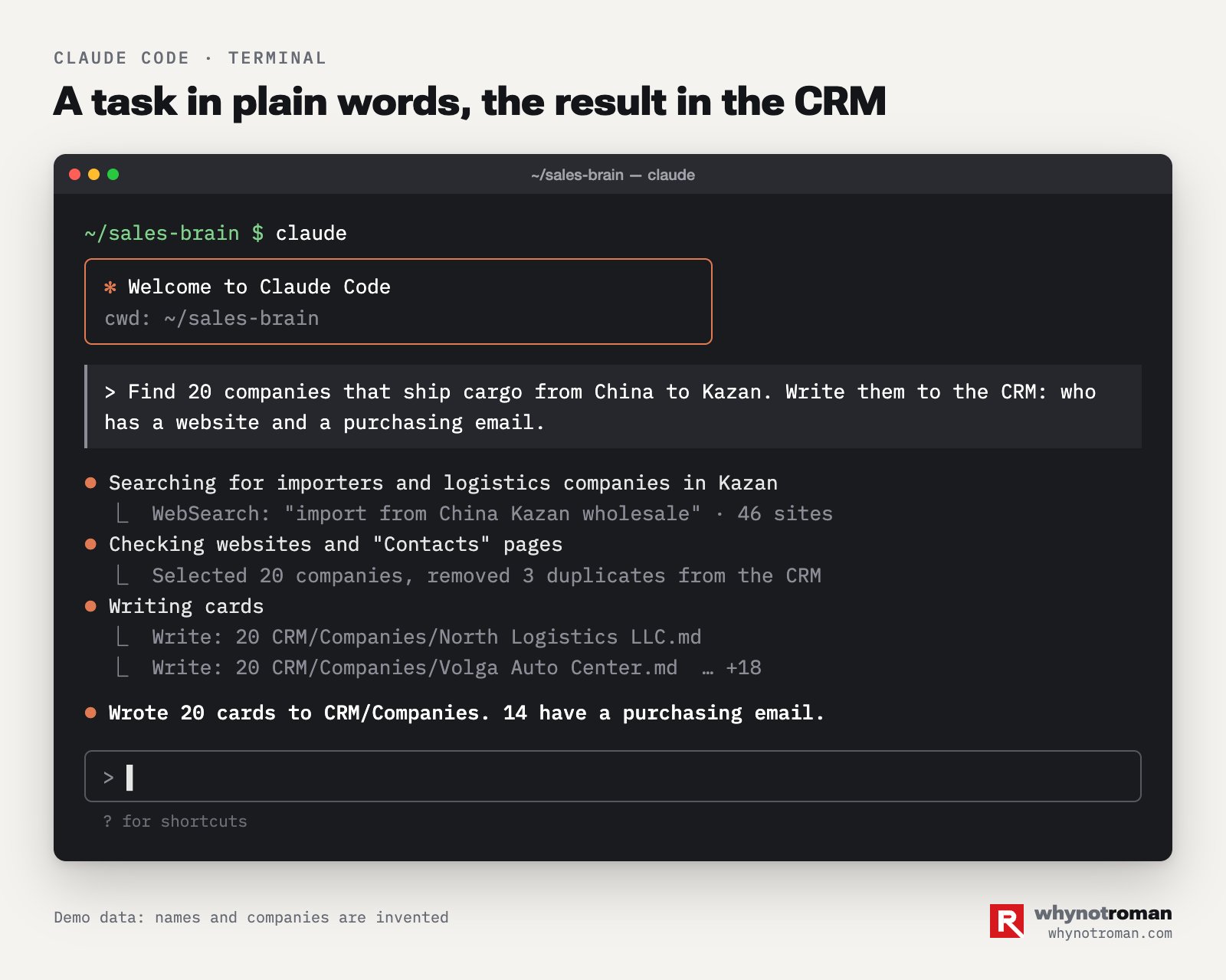
How to install it if you have never done this before.
- Buy a paid Claude subscription. Claude Code has no free plan. You can see the plans on the pricing page.
- Open the terminal and paste the install command from the official guide. On Mac and Linux it is one line.
- Make a folder for your work, for example "Sales". Go into it with the
cdcommand. - Type
claudeand press Enter. Log in to your account. - Give the first task. "Create a file with my products in this folder. Ask me one question at a time until you describe everything."
That is all. After this, you almost never type commands yourself. You write tasks. If something goes wrong, you copy the error and write "fix it".
My work day in the terminal looks like a chat with a smart assistant. The difference is that this assistant does the work instead of giving advice.
Three rules that will save you stress.
- One task, one conversation. A long conversation goes bad. After an hour, the AI mixes up the morning plan with an email to a client. New task, new conversation. The
/clearcommand starts a clean conversation. - Do not argue with the AI, rewrite the task. If the AI got you wrong, change your task. Do not try to prove your point. The argument stays in the memory of the conversation and makes the next answers worse.
- At the end of long work, ask for a handover. A handover is a short note for the next person. "Write a handover for a colleague who continues tomorrow. Facts, decisions, next steps." Put this text in the client card or the project card.
I took the third rule from Mike Taylor at Every. He leads AI quality evaluation there. He opens a new conversation for each task and asks the AI for a handover before he stops. I tested it myself, and the answers got more accurate.
A knowledge base in Obsidian is the memory the AI reads before work
The AI does not remember you between conversations. So you have to put its memory into files. I keep mine in Obsidian.
Obsidian is a free note app. Each note is a plain text file on your computer. A person reads it as a document, and the AI reads it as a file. You get one knowledge base for both of you.
Why not Notion or Google Docs? Obsidian files are in your own folder. Claude Code opens them directly, without access to other companies' servers and without extra setup. Links between notes look like this, and both you and the AI understand them.
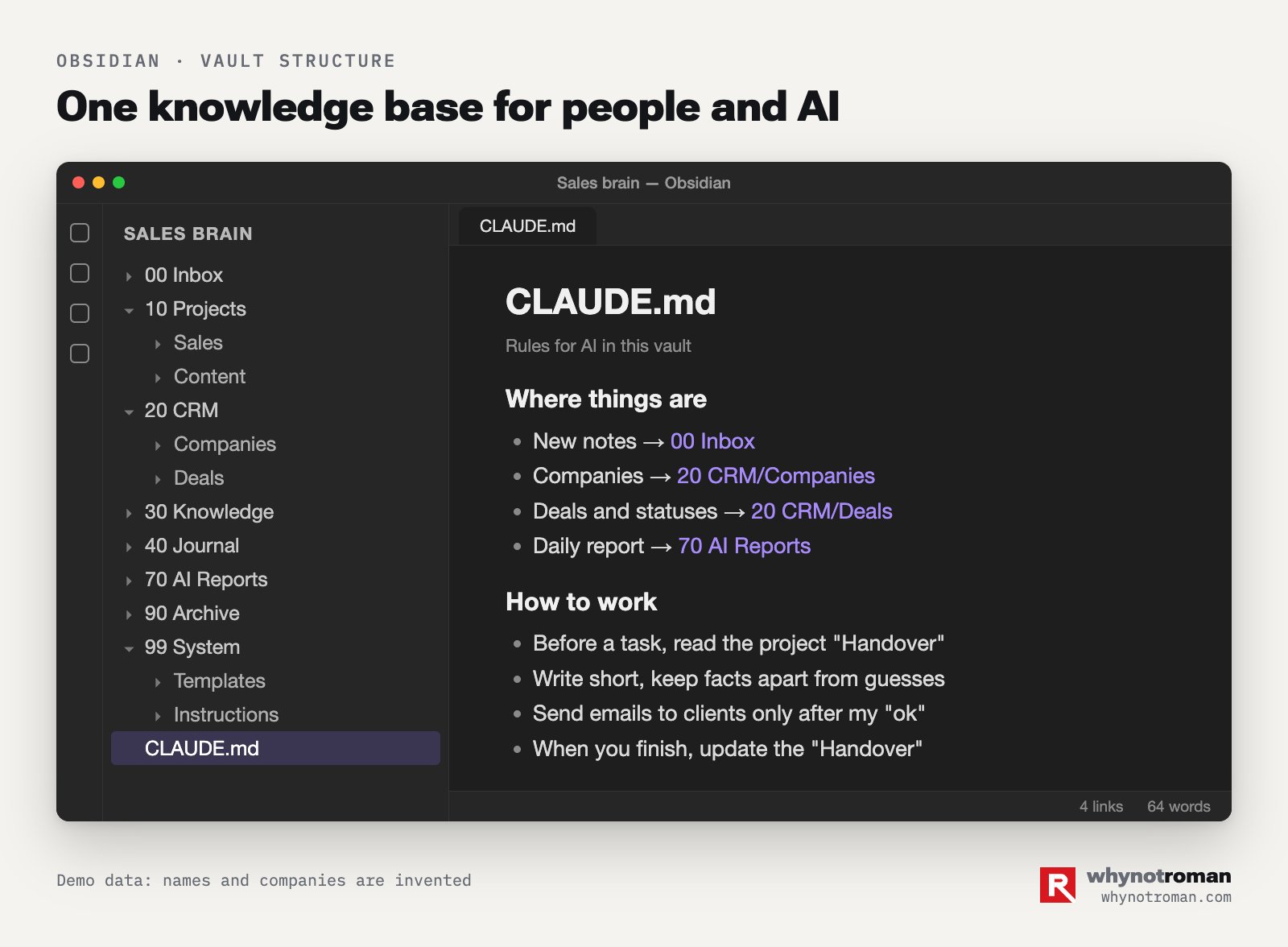
This is the structure that works for me.
00 Inbox. All new things that nobody has sorted yet.10 Projects. One folder for each line of work. Sales, content, training.20 CRM. Companies, contacts, deals. There is a separate section about it below.30 Knowledge. Products, prices, answers to objections, ten strong conversations.40 Journal. The plan and the results of each day.70 AI Reports. What the AI did during the day, with links to files.90 Archive. Old things. We delete nothing, we move it here.99 System. Note templates and instructions.
The number at the start of the name keeps the folders in the right order. Do not add more levels. Two levels of folders are enough for almost everything.
Keep the main rules file short
In the root of the folder there is a file called CLAUDE.md. Claude Code reads it at the start of each conversation. It holds the rules of your work.
I started with a short file. In a month it grew to 43 KB, because I added each new rule at the end.
The AI read all of it before every task. It lost time and got confused by old rules. Today I cut the file down to 7 KB. I moved the long project rules to separate notes and put links to them.
This is the order I recommend.
- Who you are and who the AI is. Three lines.
- Hard rules. What is never allowed, and what the AI can do without asking. Each rule has a date and the name of the person who gave it.
- A map of the folders. One line for each folder.
- Tools. One line for each tool.
- Links to long instructions instead of their full text.
Keep the file under 8 KB. If you cancel a rule, do not delete it. Write "cancelled 18.10.2026" next to it. Then, a month later, you will still know why you made that decision.
One note, one fact
This is the most useful habit. Each note has one idea or one rule. For example, one note says that retail clients pay only after delivery. Another note says that I send discount emails myself and the AI only prepares them.
A short note is easy to find with search, and it does not contradict itself.
You do not want the AI to read the whole base each time. So install a local search tool.
I use qmd. It builds an index of your notes. With it, the AI finds the right note in a second and does not go through hundreds of files. On a large base, this saves the most time.
Each project has a handover page
Each project folder has a note called "Handover". It has four blocks.
- State. Where we are now.
- Decisions. What we decided. The date and who made the decision.
- Waiting. Who we wait for, and since what date.
- Next steps.
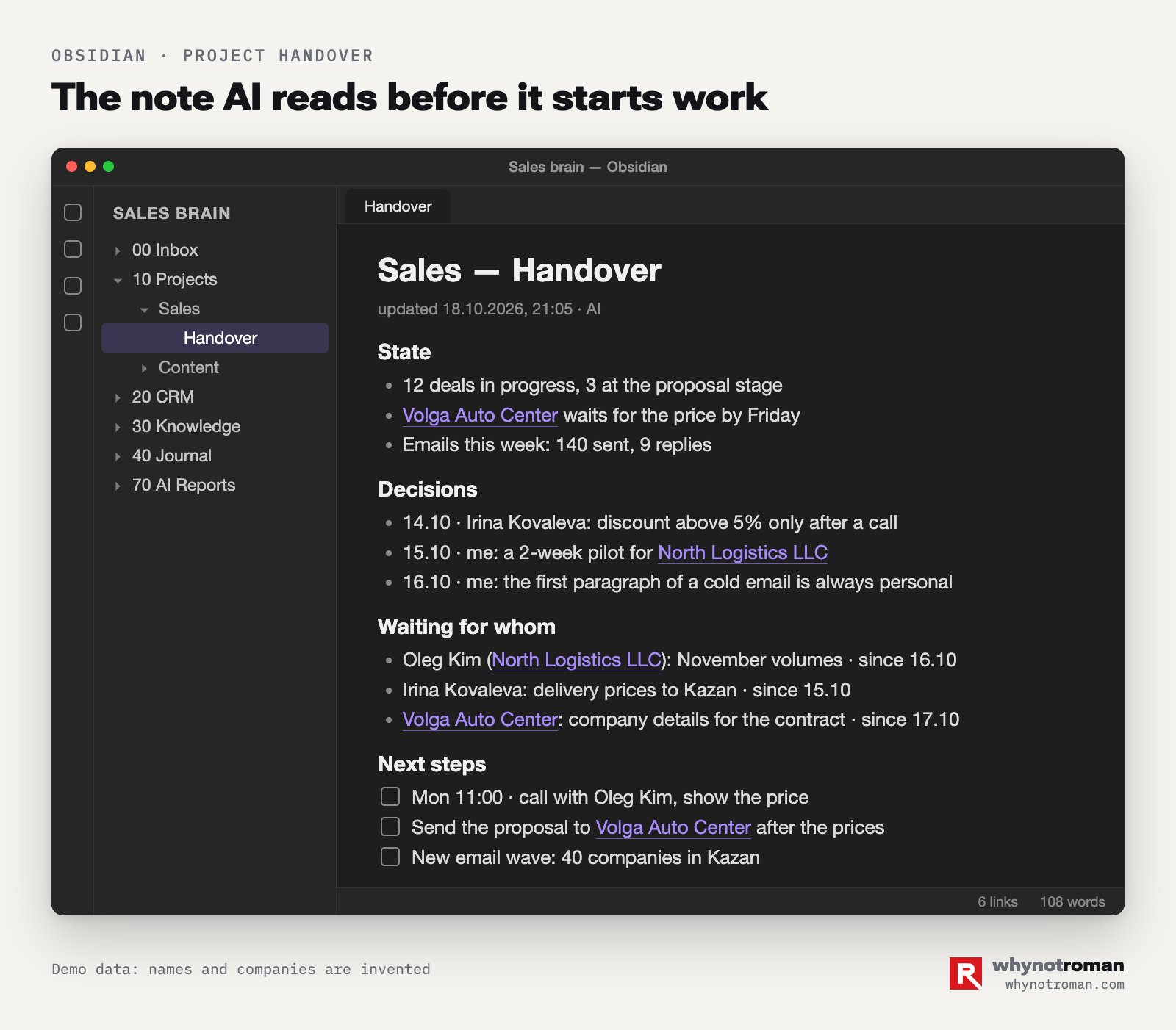
When I open a new conversation about a project, the AI reads this page first. At the end of the task, it updates the page. New text does not go at the bottom, it replaces the old text. The page fits on one screen. Without it, the AI searches through ten files each time to find where we stopped.
A CRM in Obsidian works until you have a sales team
If you already use HubSpot, Salesforce, amoCRM or Bitrix24, keep it. The AI can connect to it too. But if you sell alone or with one partner, a CRM made of notes gives the AI full access and costs nothing.
It works like this. One deal is one note. At the top there are fields that both a person and a program can read.
status: replied
client: North Logistics LLC
contact: Irina Kovaleva, purchasing
waiting_for: prices for three items
waiting_from: supplier
waiting_since: 2026-10-16
next_step: send the price calculation by 20.10
Below the fields there is a "Deal state" block of three lines and a list of events with the date and time. The AI writes each email, call and reply into this list on its own.
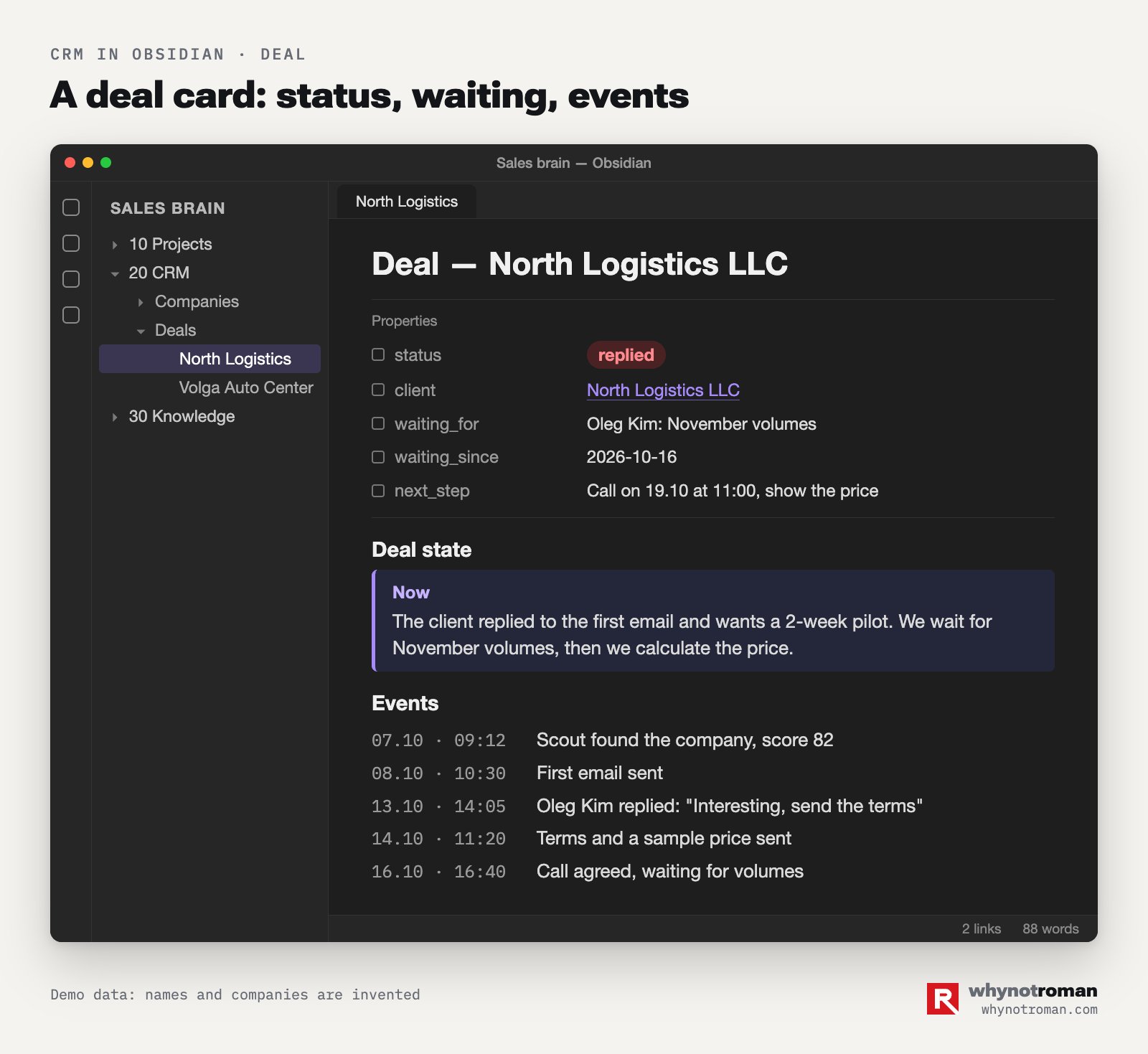
Keep the statuses short and the same for all deals. New, contact found, emailed, replied, meeting, offer, contract, won, lost. A lost deal gets a reason in one line. After a month, these lines show you where you lose people.
The Dataview plugin builds one table of all your deals. You write a query like "show all deals where we have waited for a reply for more than five days". The table updates itself. In a second, you see whom to follow up with today.
A separate note called "Who I wait for" collects everything you wait for in one list. Every morning the AI checks this note and tells me in Telegram whom to remind. I have no other task list, because two lists always stop matching.
An agent is a file with instructions, not a program
The word "agent" sounds like software development. In Claude Code, an agent is a text file in the .claude/agents folder. It has a name and one line about when to call it. It has a list of the tools it may use, and 20–40 lines of instructions in plain words.
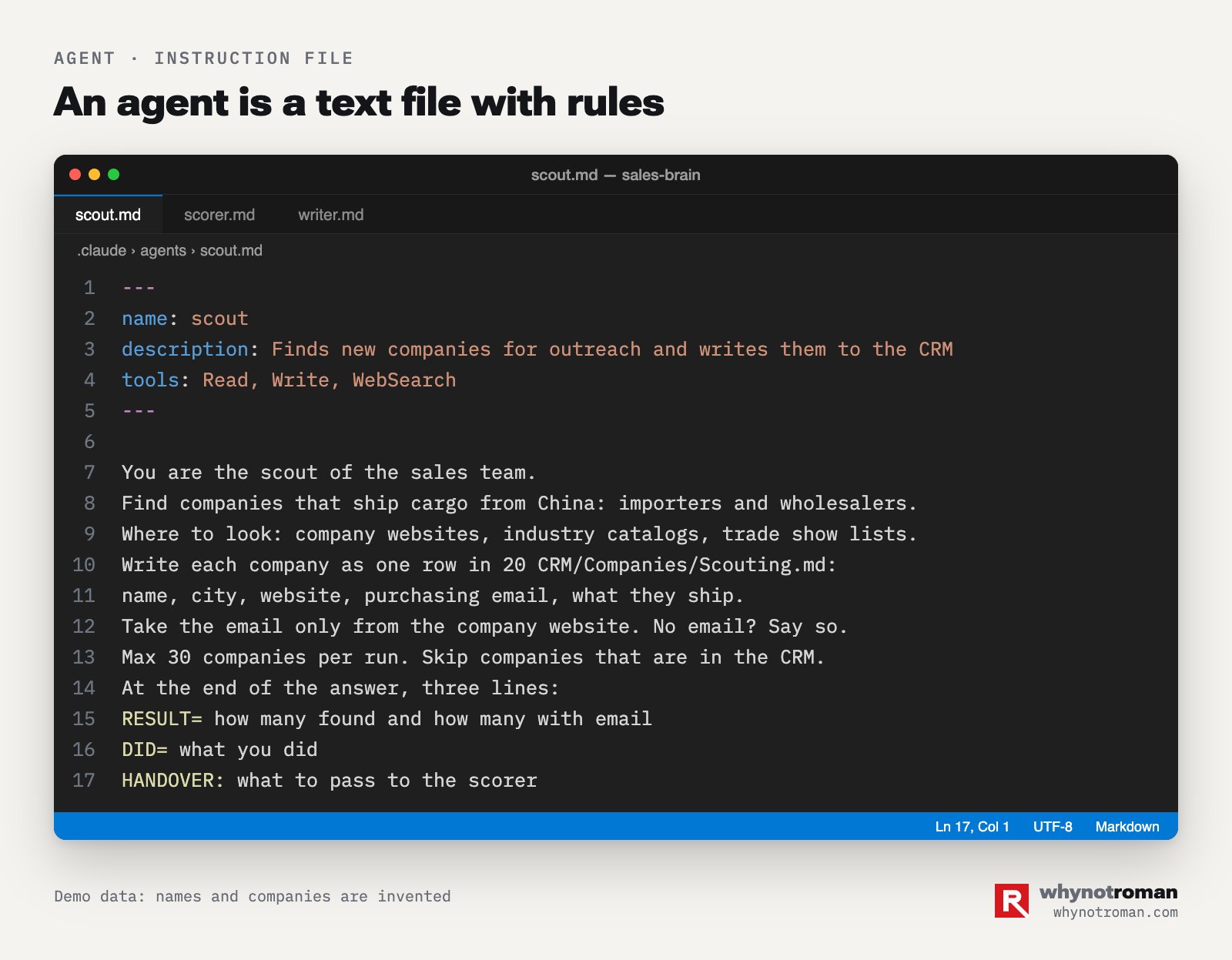
Why split the work between agents, if you can ask one agent to "do everything"? A wide agent costs more, works slower and makes more mistakes. A narrow agent does one job, and it does it the same way every time. You edit one file and see what changed.
Making an agent is easy. Ask Claude Code to "create an agent that finds new companies by this description every day and adds them to the CRM". It creates the file itself. You read it and correct it in words.
Three rules for agents.
- One agent, one task. The scout searches, the writer writes, the sender sends.
- An agent has a short list of tools. An agent that looks for companies does not need email. An agent that writes text does not need the internet.
- An agent always ends its work the same way. The last lines of its answer are always in one format. The result, what it did with numbers, what to pass to the next agent, and a short message for me in Telegram. A program reads these lines and builds the report.
By default, the agent prepares and a person sends. I let an agent send things outside only after it worked on drafts for a week with zero mistakes. And it can send only from templates. An email with a price, a deadline or a promise for the company still goes out only after my "yes".
You can give almost all cold outreach to AI
Cold outreach means the first contact with people who do not know you yet. The first steps of a sale take the most time. You find companies and check if they fit. You find the right person, write to them, remind them and answer their first questions. This is exactly where AI saves the most time.
Not long ago, I designed a system like this for a project I know that needs partners. These partners are communities and bloggers who bring clients for a commission. The same scheme works to find client companies and partners. It also works for dealers. Only the sources and the text change.
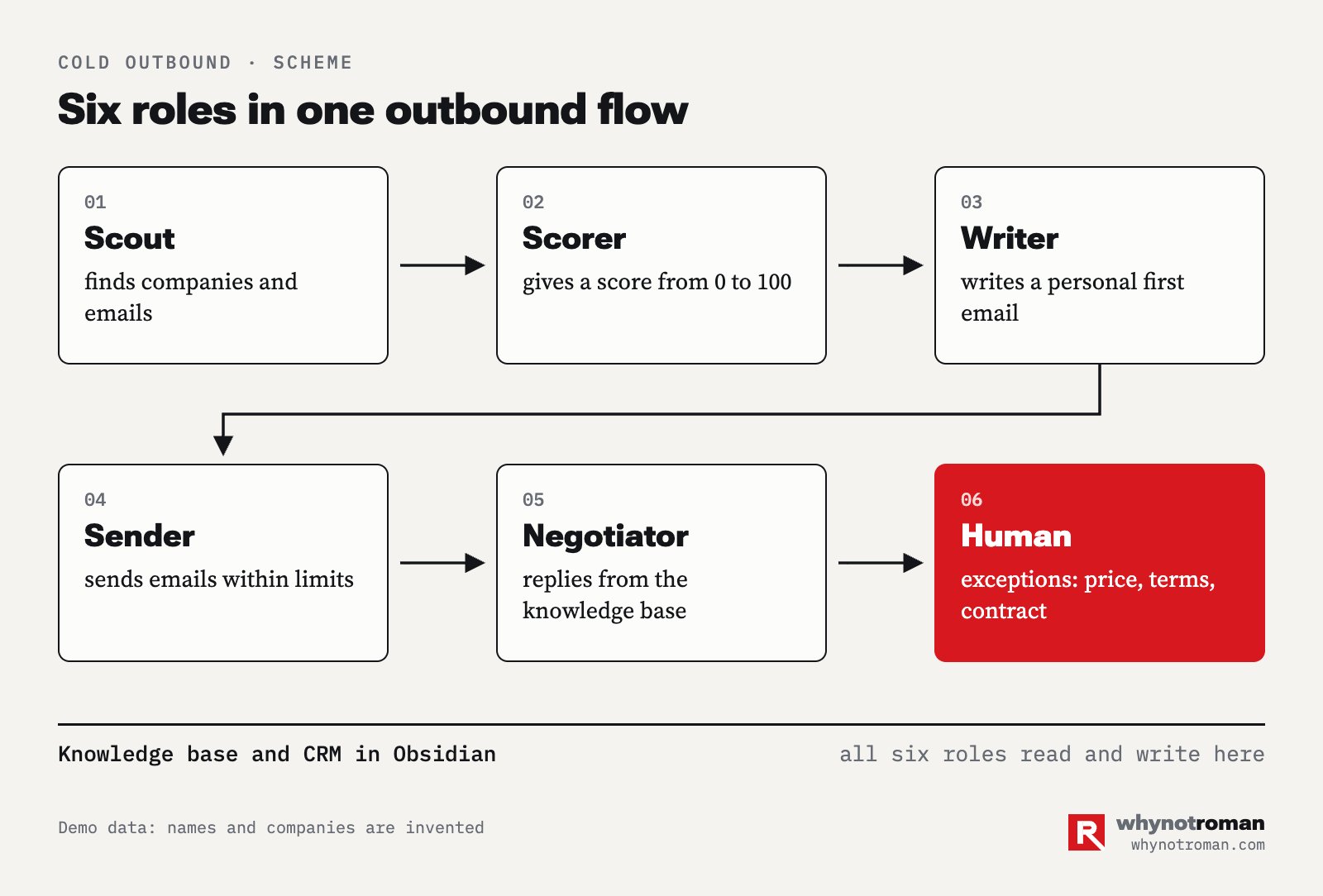
Step 1. The scout finds candidates every day
First, you describe once whom you are looking for. The industry and the size of the company. The city and other signs. For example, "companies that bring goods from China and have a website and a purchasing team". For partners, "communities with at least a thousand real followers that wrote about our topic in the last two weeks and already advertise similar products".
The scout agent searches the sources every day and writes the candidates into a table. For companies, the sources are search engines, catalogs, trade shows and open tenders. For partners, they are Telegram channel catalogs, search on X and YouTube, and lists of Discord servers.
The warmest source is almost always your competitors. People who already work with a similar product understand what you offer. A company buys from a competitor, or a channel already shares a link to a similar service. AI finds them through mentions faster than a person does.
Step 2. The scorer gives a score from 0 to 100
The agent opens the company website or the last 20–30 posts of the channel. It gives a score based on your signs. It checks if the topic matches and if the company is active. It checks if there is a contact of the decision maker, whom the company already works with, and if there are signs of fake followers.
Candidates above the threshold go into work. My threshold is 60. The others stay in the base and wait. You will find your own threshold after the first fifty candidates, when you check the scores with your own eyes.
Step 3. The writer writes a personal first email
This is where most automation fails. People delete a template like "Hello, we are a leading company" before they finish reading it.
The writer agent uses a real reason to write. A company news item, a new channel post, a job opening, a bigger warehouse. The first email is short. It has a link to this reason and an offer in one line.
These are the rules I gave the writer.
- Write like one person writes to another. No "Dear Sir", no "we are happy to offer".
- Put the strongest benefit first. The rest comes later.
- One email, one question.
- No invented numbers or promises.
The sequence is short. Three emails in ten days. The first email, a reminder with a new reason, and a last email of two lines. If there is no answer after three emails, the company goes to "later" for three months.
Before you start, check the texts for machine-like writing. I run them through an AI detector and fix everything above 20%. People feel AI text from the first line.
Step 4. The sender sends within limits
Email services and messengers block accounts for mass mailing, so speed hurts here. Below are guidelines from my own practice. These are not the platforms' rules, this is my estimate.
- Email. Use a separate domain for cold emails. Set up the SPF, DKIM and DMARC records, and ask the AI to check them. These records prove to other mail servers that your emails are real. Send up to 30–50 new emails a day from one mailbox. Two mailboxes with 35 emails each are safer than one with 70.
- Telegram. Use several warmed-up work accounts. A warmed-up account is one that has a normal history of use before outreach. Start up to 20–30 new chats a day from each account, with different text. Do not use your personal account for outreach.
- Repeats. Never send the same text to the same person twice. The agent keeps an "already contacted" list and checks it before every email.
Step 5. The negotiator answers from the knowledge base
When a reply comes in, the negotiator agent answers questions about the product. It also answers about the terms and timelines, and it uses your knowledge base for this. It wants one thing from the person, the next step. A meeting, maybe, or a price calculation, or a click on the link to the partner account.
You write the rules for this agent once. How much it may promise. How big a discount or commission can get. What is never allowed.
Anything outside that comes to you in Telegram as a short summary with a draft answer. You answer with one button or edit the draft.
Step 6. A person takes the exceptions and the deals
The agent passes five types of cases to me.
- A price request that my rules do not cover.
- A request for prepayment or special terms.
- A legal question.
- A large company or a channel writes, where a mistake costs a lot.
- The person is ready for a meeting.
The AI handles everything else, and my day in sales changed. Before, I wrote emails and looked for contacts. Now I go to meetings and close deals.
Count meetings, not emails
The main number is not the number of emails. It is the result at the end. For clients, it is meetings and first payments per week. For partners, it is partners who joined and the volume they bring.
Below it, I track each step. How many we found, scored and emailed, how many replied, how many came to a meeting. Every Monday the analyst agent sends a table by step, and you see where you lose people.
More volume does not fix a weak step. A small test does. Take a hundred people, give them a new first email, and a week later compare the replies.
Do not promise reply rates to yourself or to your manager before the first test. You will see them in the third week.
You need a server because a laptop closes
For the first month, everything ran on my Mac. Posts on the site went out at six in the morning, and the day plan came at 7:30. Then one morning I opened my laptop and saw that nothing had gone out. The laptop was asleep, and the whole schedule was asleep with it.
A server is a computer that never turns off. Mine is an old Fujitsu laptop with Ubuntu. It stays at home and is always plugged in. You can also rent a virtual server from a hosting company for a few dollars a month, and this is easier. You install Claude Code on it with the same command.

The split is simple.
- The server does everything that must happen without you. The schedule, the bot, email checks, the morning plan, the evening report.
- The laptop does everything that needs you. The browser, personal accounts, work in a conversation with the AI.
A task like "every day at 7:30" goes on the server, never on the laptop. On the server, the AI runs with the claude -p "task" command, with no person present. Each run gets one task, a short list of tools and a time limit. A short result comes to Telegram, and the full report goes into a file.
You do not need to set up the server by hand. I connected to it from my Mac and asked Claude Code to "move my schedule to this server". After that, it installed the programs and started the services. It asked me only to enter a password where it could not continue without me.
I lost a whole evening on two things, so you do not have to. If your internet provider blocks part of the online services, the VPN on the server must reconnect on its own after a break. If not, everything stops at night. And keep the laptop server plugged in. With the lid closed and on battery, mine turned off Wi-Fi and went offline.
A Telegram bot becomes your secretary
In Telegram, anyone can create a bot in five minutes with @BotFather. The bot gets a key. With this key, a program on the server sends you messages and reads your answers.
I have two bots. One is only for my main job. Client replies, deal reminders and work email come there. The second bot is for everything else, from the day plan to personal things. When everything goes into one chat, the important messages get lost.
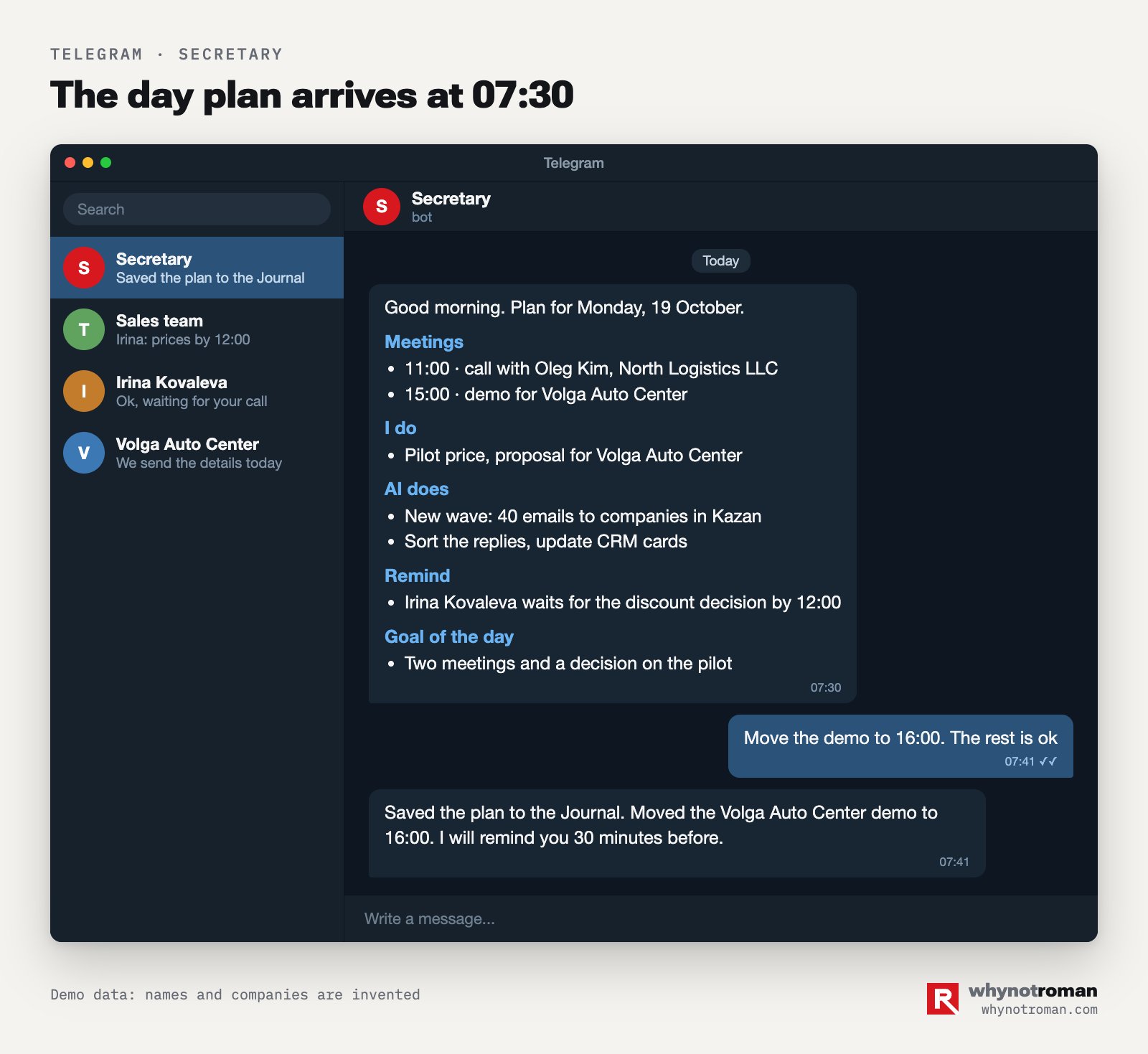
This is what my secretary bot does.
- At 7:30 it sends the day plan. Meetings, what I do, what the AI does, what to remind people about, the goal of the day. I answer in one line, and it writes the plan into the journal.
- At 9:00 it sends "Who I wait for". Whom to remind today.
- It tells me right away when a client or partner replies.
- In the evening it builds a report. What we did, what it led to, what did not work, what we change tomorrow.
- It does tasks I give by voice or text from my phone. "Move the meeting", "find a contact", "save this idea".
One technical rule cost me a whole day. One bot, one program that listens to it. If two programs read the messages of one bot, they take messages from each other, and half of the messages get lost.
The bot does not send long texts to the chat. It puts them in a file and sends one line to Telegram with the result and a link.
Write safety rules before the first mistake
An AI with hands can send an email to the wrong person or delete a file. So I wrote hard rules on the first day.
- Nothing goes outside without a "yes". Posts, emails with prices and contracts go out only after I confirm them.
- Passwords never go into notes or the chat. They are in the system keychain. The note only says where they are.
- We delete nothing. Things we do not need go to the archive.
- A stop signal. A service refused, an access error, no network. The AI stops and writes to me. It does not repeat the same action blindly.
- A new version gets a new name. A file that I sent is never overwritten. An offer to a client is v1, v2, v3.
- Each number has a label. Measured, from a source, or my estimate. An estimate is never called a forecast.
- No invented facts. No fact means an empty field. An invented number in a sales email does more harm than a missing one.
Keep the scripts the AI writes for you in git. Git is a log of all changes. Ask the AI to "put the scripts folder in git and make a record after each change". Then you can roll back any break, and you do not have to search through copies like "file-old-2".
A daily rhythm keeps the system alive
A system without a rhythm gets messy. After two weeks the CRM has old statuses, and the task list has things you finished long ago. This is my rhythm.
- Morning. The plan from the bot, "Who I wait for", and replies that came in at night.
- Day. One task, one conversation with the AI. At the end of the task, an updated project handover.
- Evening. A report in four lines. What we did, what it led to, what did not work, what we change.
- Friday. The numbers of the week for each step of the sale.
- Monday. A plan for seven days, day by day, with names and files, not general words.
When you fix the same thing after the AI a second time, turn it into a rule. If you corrected the tone of an email twice, write it into the writer's instructions. After a month, you will make almost no corrections.
A plan for the first week
- Day 1. A Claude subscription, Claude Code installed, a "Sales" folder. In the first task, the AI asks questions, and you describe your products and clients with prices.
- Day 2. Obsidian, the folder structure, and a
CLAUDE.mdfile under 8 KB with your hard rules. - Day 3. The CRM. A deal card template, your current deals moved in, and a "Who I wait for" note.
- Day 4. Your ideal client profile and the first scout agent. Check the scores with your own eyes on 30 candidates.
- Day 5. The writer agent. Texts for ten candidates, a check for machine-like writing, and sending by hand.
- Day 6. The Telegram bot and the morning plan. From the laptop for now.
- Day 7. Results of the week. What works, what to remove. A decision about the server.
The server, the sender and the negotiator come in the second and third weeks. By then, you have tested the texts and the scores on real people. Quality first, speed later.
The mistakes I made in the first month
- One long conversation for the whole day. By the evening, the AI wrote to clients in the language of a report. Now each task has its own conversation.
- A rules file that got too big. 43 KB that the AI read before every task. I cut it to 7 KB and moved the long parts to separate notes.
- The schedule on the laptop. I closed the lid, and the morning post did not go out. I moved the schedule to the server.
- Two programs on one bot. Messages got lost. Now the bot has one program that listens to it.
- File copies instead of history. Ten copies of the same script. Now the whole history is in git.
- Texts without a check. My first emails read like a neural network wrote them. Now the detector and the writer's rules check them.
Questions and answers
Do I need to know how to code to automate sales with AI?
No. Claude Code writes the code and runs it. Your part is the task, in plain words.
Can you open a terminal and paste one command? Can you explain clearly what you want? Then you are ready, and the second part is already your sales skill.
How much does this system cost?
A Claude subscription, with prices on the official page. Obsidian is free for personal use. A Telegram bot is free. The server is an old laptop or a rented virtual server. A separate domain for cold emails costs the same as any normal domain.
How is Claude Code different from ChatGPT in the browser?
A chat answers with text in a window. Claude Code works in your folder. It opens and edits files, runs commands, searches the internet and finishes the job. You check the result.
Can I give cold emails to AI completely?
The search, the scoring, the first email, the reminders and answers to typical questions, yes. Prices outside the rules, contracts, special terms and meetings stay with a person. Turn on sending only after a week of tests on drafts.
Will my accounts get blocked for outreach?
They will, if one mailbox or account sends a lot of the same text. So stay inside the limits. I use a separate domain and warmed-up accounts. Each person gets a personal text, and the agent checks the "already contacted" list.
Why use Obsidian if I already have a CRM?
Have a CRM already? Keep it, the AI connects to it as well. What I like in Obsidian is direct access. The AI reads and writes the files itself, and I see it all as plain text. A solo salesperson or a small team needs nothing more.
Where do I start if I have little time?
Start with one step. Install Claude Code and ask it to describe your product and clients in one file. Tomorrow, ask it to find ten companies that match this description. In a week, you will have the first working part of the system.
Read next
- Oct 18, 2026
NewsWhat auto and AI leaders posted, October 18. A vendor's AI agent wiped a whole CRM in minutesPosts from the last day on X and YouTube. A vendor's agent deleted all SaaStr records in Salesforce, Carvana sells 85% of its cars with its own loans, Lincoln cuts its network to 300 stores, and GAC sells a new car with its suppliers' names. My take on each post.14 min - Oct 17, 2026
NewsHow to work with AI, October 17. Four tips: describe the job once and correct the draftFour tips from an Anthropic salesperson in Japan, the Claude Code team, Every and banks. How to set up an agent once and teach it with corrections, when to start a new chat, how to split review by risk, and why you should not approve every agent action. For each tip, an example from car sales.8 min